RaQuest - Requirements Management Tool

What is 'RaQuest'?
RaQuest is a Requirements Management tool in conjunction with Enterprise Architect (EA).
Requirements Management is a method widely used for managing the requirements of systems and applications effectively.
With RaQuest, you can track changes of requirements and manage requirements with various features.
RaQuest is the ideal tool to obtain efficient development of your software applications.
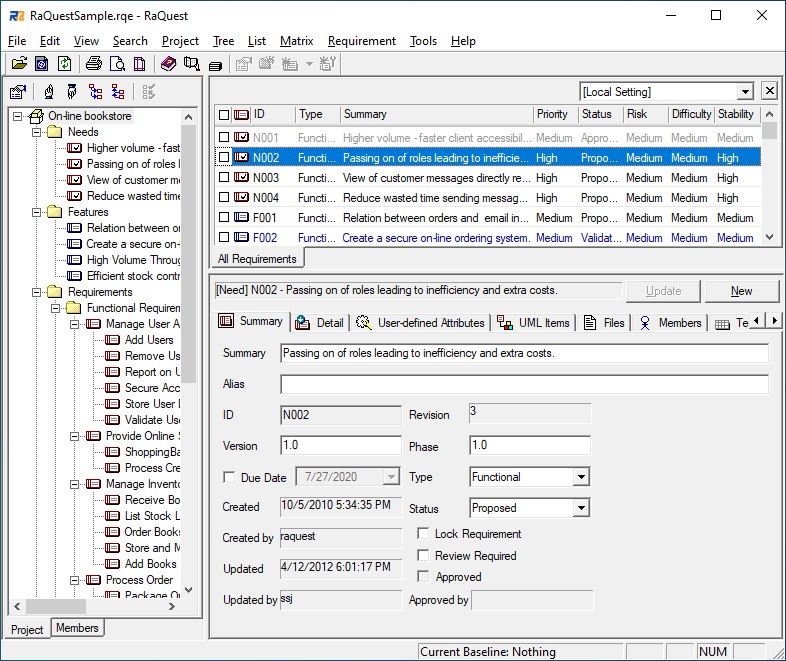
Features of RaQuest
Key Features
- Define and manage Requirement items. The followings are included:
- Summary and Detail
- ID, Version and Phase
- Due Date
- Type
- Status
- Difficulty, Priority, Stability, and Risk
- Keywords
- User Define Attribute
- File Path or URL of Requirements
- Assigned Member
- Comments for Requirements
- Update Log
- Relationships between Requirements
- Test Items assigned to Requirements
- The main window has two panes. The left pane is Project Tree view to show the requirements hierarchy and the rgiht pane is List to show Requirement items at a glance.
- Create Packages to manage Requirement items.
- Generate documents for whole project or a part of project in the following formats:
- Print list of Requirement items.
- Create 'Change Requirement' for existing Requirement items.
- Approve Requirement items.
- Set new Baseline and compare new Baseline with old Baseline.
- Glossary feature to manage terms used in project.
- Add-in for importing Requirements from MS-Word.
List View
- You can show the following types of lists:
- Requirements in any Packages or whole project
- Requirements assigned to a specified member
- Requirements pending Approval
- To-Do list
- Files and URL's
- Requirements with Priority level
- and much more...
- Sort current list
- Filter list by a specified word
- Search whole project by specified condition
- Customize list elements
- Color Requirement items in list by their status
- Select multiple Requirements
Tree View
- You can show following trees:
- Project Tree
- Member Tree
- Tree by Type
- Tree by Status
- Custom Tree
Tracking Requirements
Show the following types of relationship:
- Relationship between Requirement items
- 'Connected' Requirements when a Requirement is changed
- Relationship between Requirements shown in Matrix View
Features related to UML Modeling tool Enterprise Architect
- All information is saved in .EAPX/.EAP file or EA Repository
- You can modify Requirement items in EA
- Generate Use Case elements of EA from Requirements and perform synchronization of Use Cases
- Generate Requirements from existing UseCase elements of EA
- Generate Requirements from existing Requirement elements of EA
- Refer and edit relationship between Requirements and UseCases in Matrix View
- Compatible Glossary feature with EA Glossary
- Generate Classes from terms in Glossary
- Members' information is compatible with EA resource
Future Features
- Authorize access right to prevent malfunction
Related Information
Please also check following pages.

 RaQuest
 Download
 Purchase
 Support
 Registered Users
 About Us